Whop Ads reporting is useful only when you know which events and purchases a metric includes. Separate ad delivery, attributed conversions, completed payments, and contribution after costs. A high ROAS can coexist with refunds, weak margins, or an incomplete tracking installation.
Disclosure: AdsX owner Dennis Hegstad is employed at Whop. AdsX may earn a commission from qualifying businesses referred through our signup links. This guide is based on public documentation reviewed October 4, 2026, not an AdsX advertising test. Worked examples are illustrative. Editorial policy.
Original AdsX illustration.
Start with a metric dictionary
Whop’s campaign reference distinguishes link clicks, attributed results, purchase value, and return on ad spend. Check the definition of the selected result before dividing spend by it. A booked call, a lead, and a purchase are different business events.
Write down the definitions used in your own report:
| Measure | Question it should answer |
|---|---|
| Impressions | How often was the ad shown? |
| Link clicks | How often did someone click through toward the destination? |
| Selected conversion | Which completed action is being counted? |
| Attributed purchase value | Which sales were assigned to the campaign? |
| ROAS | What attributed revenue is being divided by what spend? |
| Contribution after acquisition | What remains after the relevant variable and acquisition costs? |
Keep the report’s time zone, currency, date range, attribution basis, and destination beside these definitions. A number copied without its scope can be misleading even when the original report is correct.
Whop checkout and external checkout need different handling
Whop’s pixel installation guide says its own checkout purchases are reported automatically. Externally processed purchases need to be reported by the merchant’s integration, with a positive value. The guide says those appear separately as external purchases and that its purchases/ROAS measures count Whop-processed payments.
The campaign API reference describes purchase-value fields more broadly. Because these descriptions are not fully aligned, verify the exact dashboard column or API field against a known order before assuming that Shopify sales are included in a displayed ROAS. Record the field name and observed scope in your reporting notes.
For the implementation itself, use our Shopify pixel walkthrough. This article concerns what you can conclude after data arrives.
Reconcile one order before a whole campaign
Choose one authorized test transaction and write down its order reference, amount, currency, time, checkout provider, and expected event. Inspect both the sending integration and receiving report.
If the same purchase appears twice, investigate whether two systems sent it or whether a confirmation-page revisit created a new conversion. If it is absent, first check whether that report is supposed to include the checkout provider in question. Those are different problems with different fixes.
Keep customer identifiers and debugging payloads private. A useful internal reconciliation record rarely needs to be copied into a public issue or article.
Work through a complete example
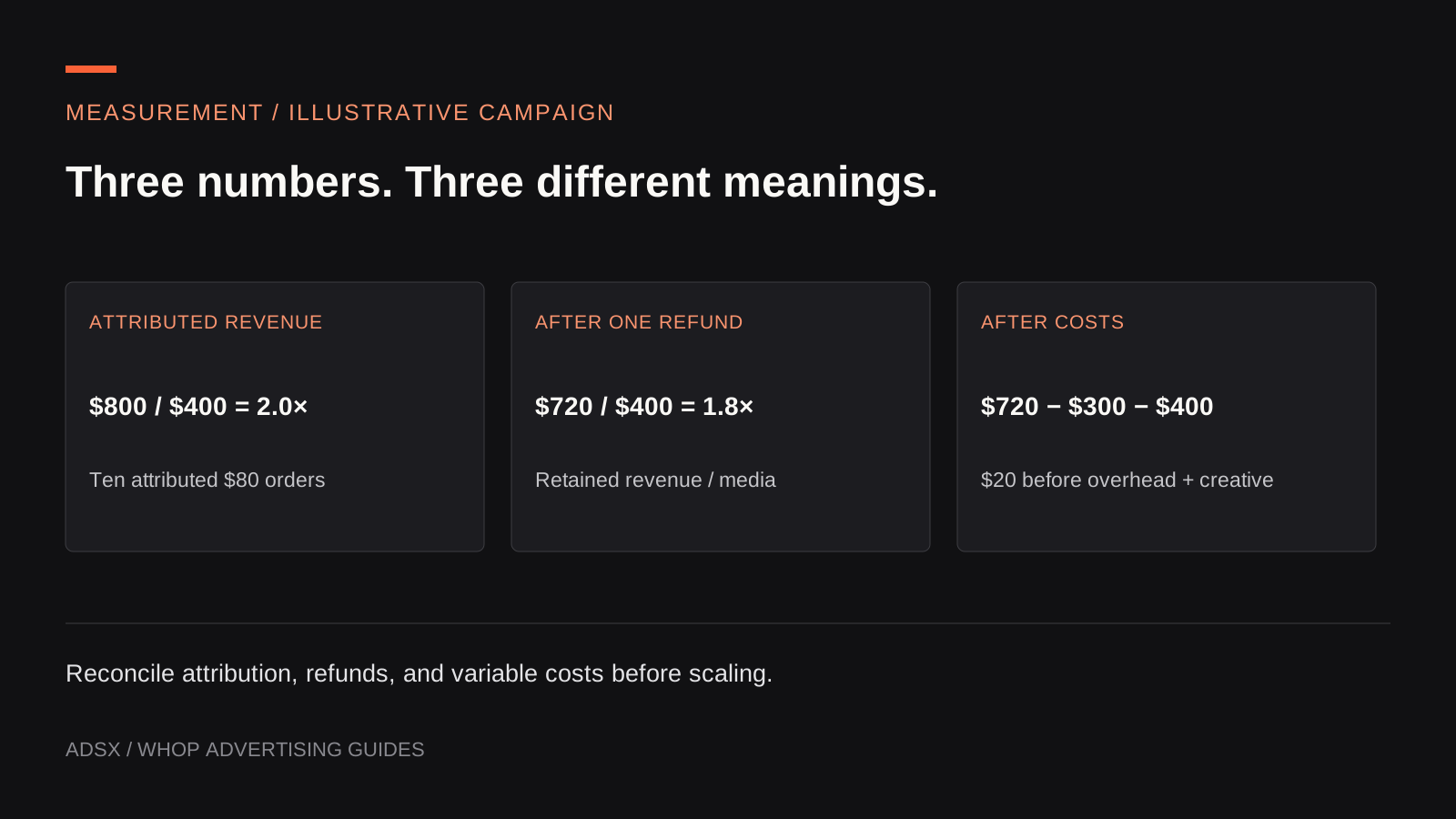
Assume a hypothetical campaign spends $400 and the relevant report attributes ten $80 orders to it. Attributed purchase value is $800, so reported ROAS is 2.0×. This example assumes all ten orders belong in that report’s defined purchase population.
Now suppose one order is refunded. Retained sales revenue becomes $720. Dividing that by the same $400 gives 1.8×, using a different revenue definition. You should label the adjusted calculation rather than overwrite the original dashboard number without explanation.
Finally, assume all variable costs across the retained and refunded orders total $300, including unrecovered costs on the return. Contribution after media is $720 − $300 − $400 = $20, before fixed overhead and separate creative or operator costs.
The three figures answer different questions: 2.0× attributed ROAS, 1.8× retained-revenue-to-spend, and $20 contribution after media. None should be described as the other.
Use the break-even CPA guide to set the decision threshold before evaluating the next campaign.
Do not add attribution reports together
Suppose two tools each claim an $80 purchase. That does not establish $160 of sales. Reconcile against the underlying order ledger, then compare how each tool assigned credit.
A buyer may interact with several channels before ordering. Attribution is a rule for assigning observed credit; it does not prove that the sale would not have happened without the ad. Keep that distinction when deciding whether to expand spending.
When there are no results, distinguish zero from missing or inapplicable data. Whop’s advertising overview notes that some result fields can be null and that a configured active status can differ from actual delivery. Inspect delivery and tracking before treating an empty metric as creative failure.
Keep the commercial outcomes separate
Merchant campaign sales are not AdsX partner commissions. Our tracking-links guide explains that distinction. An outbound signup click does not establish an attributed business, qualified commission, or payout.
Start a Whop business through AdsX’s referral link, then build a small metric dictionary around the actual reports available to you. Resolve one known-order discrepancy before trusting a larger aggregate.