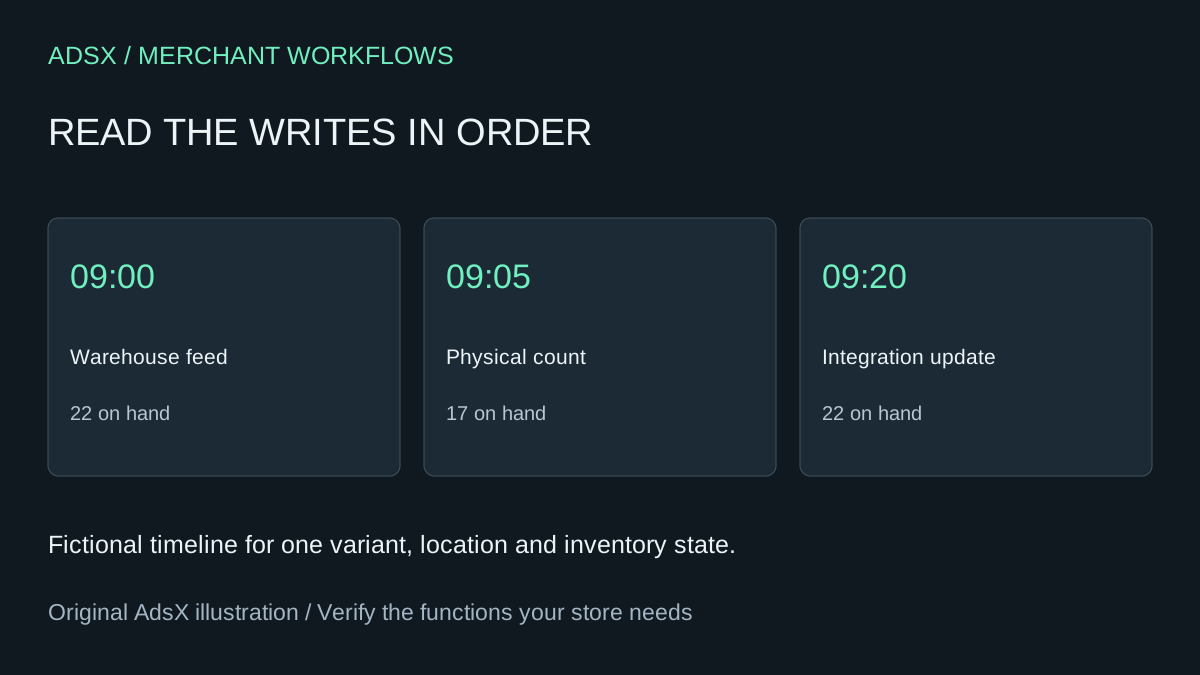
At 9:05 the counter records 17 aprons. At 9:20 Shopify shows 22 again. Another correction might hide the five-unit discrepancy for an afternoon. The first job is to identify what wrote 22 and which count it used.
Original AdsX illustration.
Compare events for the same stock
Capture the variant ID, location, inventory state and time zone from both systems. Use a single variant rather than a product total. Compare like quantities. An unfulfilled sale can change available stock while the goods are still physically present. Make a short timeline with the value before and after each event.
Open the variant’s adjustment history in Shopify. Read the recorded activity, actor or app where shown, timestamp and resulting quantity. In our example, 22 to 17 is a change of minus five. The subsequent change of plus five explains the reversal. A named integration on the second row gives the warehouse team a specific event to look up. It does not prove whether the integration sent a stale balance or a legitimate receipt. Shopify adjustment history
Match the second change to warehouse evidence
Look up the warehouse count sheet and the outbound sync record for that SKU. If the warehouse received five new aprons after the physical count, request the receipt and reconcile the later balance. If it exported a pre-count snapshot, identify the system that owns the stock balance and post the approved correction there. Watch one complete sync cycle and record the resulting balance on both sides. A second person should confirm the physical quantity if the two records still disagree.
For an older incident, Shopify’s variant adjustment view covers the last 180 days. Check the inventory adjustment changes report for longer lookbacks. Preserve timestamps before grouping by day, because a daily net of zero can conceal both a correction and its reversal. Shopify inventory reports
An assistant can sort sanitized adjustment rows and highlight opposing changes. Keep incident review read-only. The person with access to receipts and warehouse records owns the decision to change stock. A recurring discrepancy across many SKUs is a reason to investigate the integration schedule and source records before funding more manual counts.
Try the worksheet prompt
Illustrative prompt, not execution-tested.
Sort these anonymized inventory events by time for each variant, location and state. Find opposing adjustments, show the arithmetic and name the evidence needed to distinguish a stale sync from a real receipt. Preserve unknown actors. Do not change stock.
Copy the prompt from the merchant library. For related work, see Why Shopify Shows 24 Units on Hand but Only 11 Available.