A spreadsheet seller discovers a formula error after customers have already downloaded the workbook. Uploading a new workbook solves only half the problem. A returning buyer might open the original receipt, while another might keep working from a copy saved to a laptop.
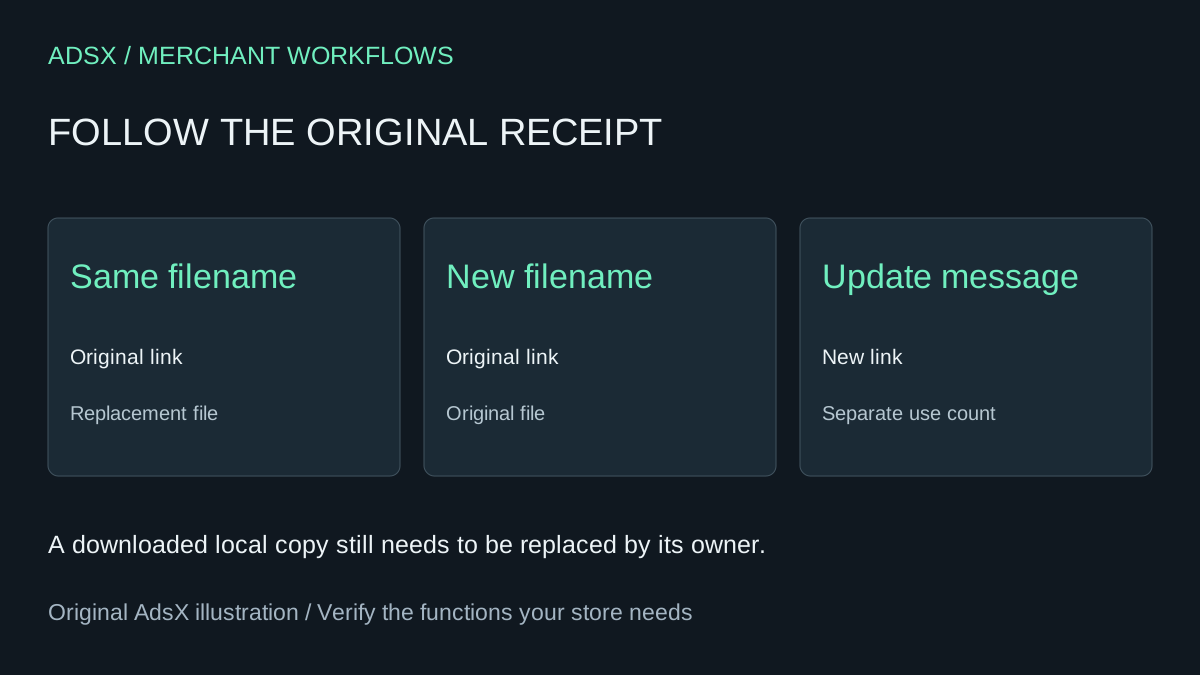
Original AdsX illustration.
Choose the edition that the buyer is entitled to
For a correction to Budget.xlsx, the buyer should usually receive the fixed workbook when reopening the original receipt. Shopify documents that in its Digital Products app a replacement with the same filename is delivered through the existing link. Put a revision date inside the workbook so support can distinguish otherwise identically named copies. A local download already on someone’s computer needs to be downloaded again.
A paid second edition is a different decision. For a replacement with a different filename, Shopify says previous links keep delivering the original file. If you choose Send update when saving the replacement, prior buyers receive new links with separately counted uses. Decide which customers should receive the new edition before sending an update. Check the affected variant, especially if the store sells a basic workbook and a bundle under one product. Shopify’s replacement-file instructions
Rehearse with a receipt you control
Use an internal test product and order. Save its original confirmation, record the asset name and put an obvious version marker inside each test file. Replace the asset. Open the old receipt and record the version it delivers. Then inspect the new buyer path. If the release includes an update email, test the update on the isolated product first. Avoid putting live customer links into an AI assistant.
Changing or deleting a listing is a poor way to revoke one buyer’s access. Use the app’s order-level download-link deactivation when revocation is intended. A file hosted elsewhere and sold as a link has different update behavior, so identify the delivery method before following a file-replacement procedure. These steps apply to Shopify’s digital delivery app. If another app issued your receipts, check its own rules with an old test receipt before promising previous buyers an update.
Try the worksheet prompt
Illustrative prompt, not execution-tested.
Given fictional filenames, variant names and buyer entitlements, draft a release worksheet for a correction versus a paid edition. Specify expected results from old and new receipts and an internal version marker. Flag ambiguous entitlements. Do not send email or use real download URLs.
Copy the prompt from the merchant library. For related work, see A Minimal Shopify App Stack for Your First Digital Product Store.