A wholesale order ships in two boxes a week apart. Your team wants to collect for the first box without asking the buyer to pay the full order again. Before generating a reminder, check whether the order supports a payment request for an individual fulfillment.
Original AdsX illustration.
Confirm the order supports the request
Shopify defines due-on-fulfillment terms as payment due when all items have been fulfilled. It also documents individual fulfillment payment requests for supported orders with these terms. A created fulfillment is required. Orders created with automatic capture at checkout or manual capture support this feature; fulfillment-based automatic capture does not, with an exception for B2B orders. Changing capture settings later does not make an existing order eligible. Verify the order before promising split collection. Shopify deferred payments
Build a balance worksheet before sending anything
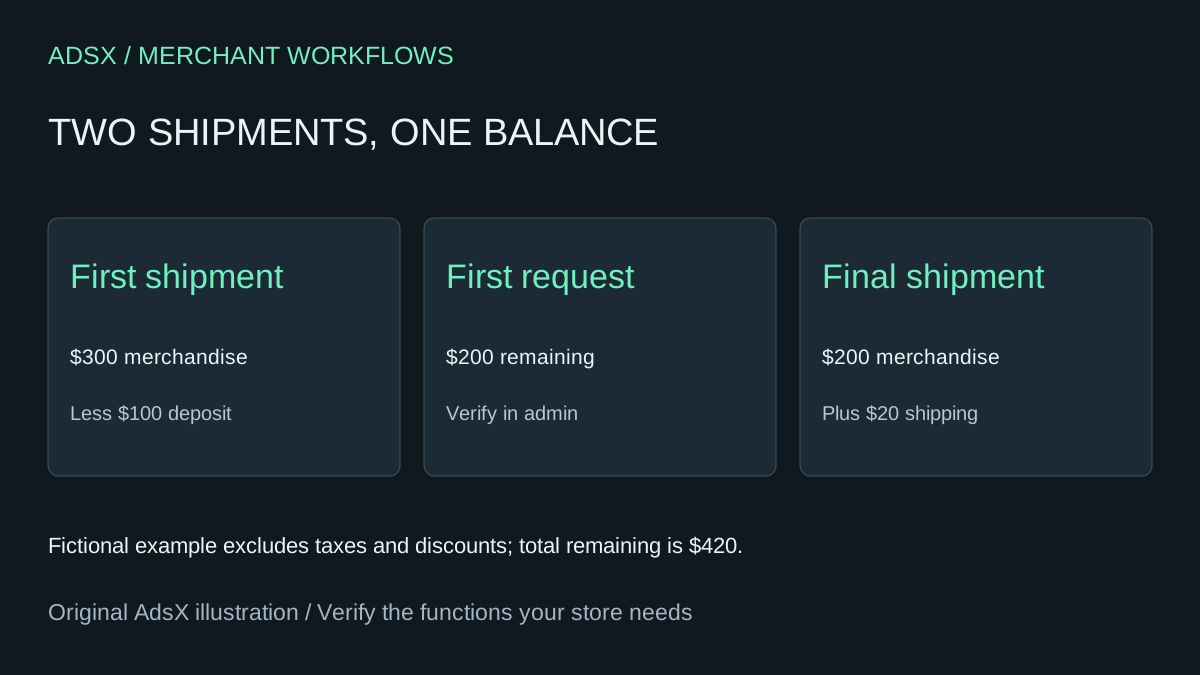
In this fictional USD example, merchandise totals $500 and shipping is $20. The customer has paid a $100 deposit. There are no taxes or discounts. The first fulfillment contains $300 of merchandise, leaving a $200 first request after the deposit. The final fulfillment contains $200 of merchandise plus $20 shipping. The two requests total $420, which agrees with $520 less the verified $100 payment.
Shopify applies an order-level deposit to the first request and puts shipping, fees and duties on the final fulfillment. Inspect the actual request for taxes and discounts; do not use this simplified example as an invoice template. A spreadsheet can reconcile the amounts displayed by Shopify without recreating every allocation rule.
Give an approved AI assistant order aliases, the recorded deposit, each fulfillment identifier and the displayed request amounts. Have it total the requests and flag missing or repeated identifiers. Keep customer names, addresses and payment details out of the prompt. If a second employee already sent a request, the worksheet should show its status so the team does not create confusing follow-up messages.
Keep payment capture separate from invoicing
A payment request asks the customer to pay. It is not evidence that funds have been captured. Shopify documents capture methods separately, so compare the order's payment status with its fulfillment status before closing the review. Shopify payment capture methods
Use a supported test order to inspect the first and final requests before applying the process widely. Confirm that the deposit appears once, the remaining total matches, and any shipping charge appears where expected. This article describes a documented native workflow and an untested analysis prompt; it does not establish that your store or order has passed those checks.
Try the worksheet prompt
Illustrative prompt, not execution-tested.
Review anonymized split-shipment orders using order total, verified deposit, capture method at creation, payment terms, created fulfillment IDs and displayed payment request amounts. Reconcile the remaining balance and flag duplicate requests, missing eligibility and unsettled deposits. Do not infer eligibility from current settings. Do not send invoices or capture payments.
Copy the prompt from the merchant library. For related work, see Which Shopify Orders Are Actually Overdue? Build a Balance Review.