Your order worksheet shows $800 in gross shipping charges, while the label bill shows $760. That looks like a $40 surplus until someone adds packing materials, a carrier adjustment and a second parcel for a split order. Use an order-level worksheet before deciding that delivery pays for itself.
Original AdsX illustration.
Define the amount you retained
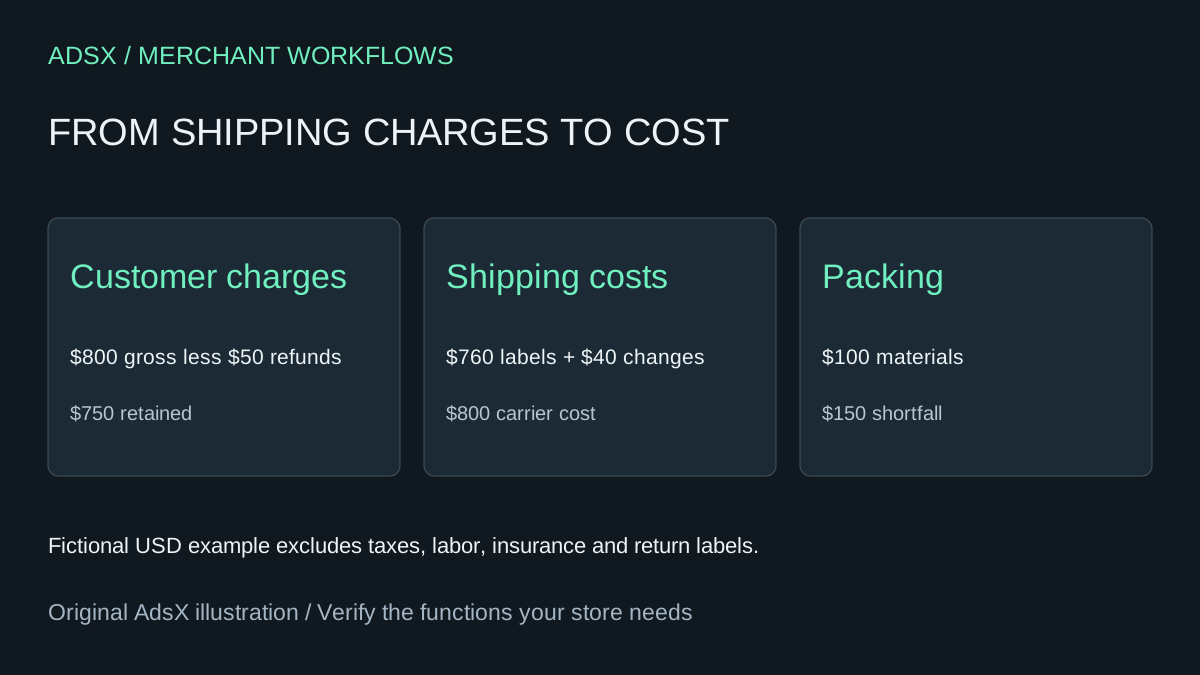
Shopify's shipping metric subtracts shipping discounts and refunded shipping from shipping charges. Start with that net amount, and preserve the underlying columns if available. In the fictional example above, $800 in gross shipping charges less $50 in refunds leaves $750. If the report already shows $750 as Shipping, subtracting the refund again would count it twice. Shopify sales metric definitions
Now match costs to the same orders. The example has $760 in labels, $40 in net carrier adjustments and $100 in packing materials. Total selected cost is $900. Against $750 retained, that leaves a $150 shortfall. It is a partial fulfillment-cost calculation, not store profit: labor, insurance, return labels, taxes and product margin have been excluded explicitly.
Match shipments rather than invoice months
Shopify bills shipping labels through the store account. Carrier adjustments can arrive later than the original label purchase. A bill for November therefore need not represent only orders placed or shipped in November. Use the order and shipment identifiers to connect each label and adjustment to the review population. Shopify shipping-label billing
Build rows with order alias, shipment identifier, shipping amount retained, label charge, adjustment, material cost and currency. If an order has two parcels, keep both shipment costs but count its shipping revenue once. Record pending adjustments as unknown; a blank cell should not automatically become zero. Keep a reconciliation date so the team knows whether the figures include later credits.
Use AI to find exceptions, then inspect them
Ask an assistant to total the sanitized worksheet and list unmatched labels, duplicate charges and orders with unusually high subsidies. Review a sample against the original bill and order timeline. Do not upload addresses or payment details to perform this arithmetic. When costs and revenue use different currencies, retain a documented conversion method before combining them.
A high subsidy might be intentional because a large merchandise margin supports free shipping. A repeated oversized-package adjustment suggests a different action: check measurements and packaging. Look at the reasons before increasing every customer's delivery charge.
For a small store, this worksheet may cover a monthly review. A paid shipping or profit app can still be useful for automated matching across carriers and repeated shipments. Compare its actual quote with the labor required to maintain the worksheet; no app-fee saving is established by generating a table.
Try the worksheet prompt
Illustrative prompt, not execution-tested.
Reconcile anonymized shipping revenue and shipment costs by order alias. Inputs include shipment IDs, retained shipping revenue, label charges, credits or debits, materials, currencies and reconciliation date. Count order revenue once across multiple parcels. Show selected-cost surplus or shortfall and list excluded costs. Flag unmatched labels, duplicate costs, missing values and mixed currencies. Do not change checkout rates.
Copy the prompt from the merchant library. For related work, see Shopify Free Shipping Threshold: Check the Margin Math.