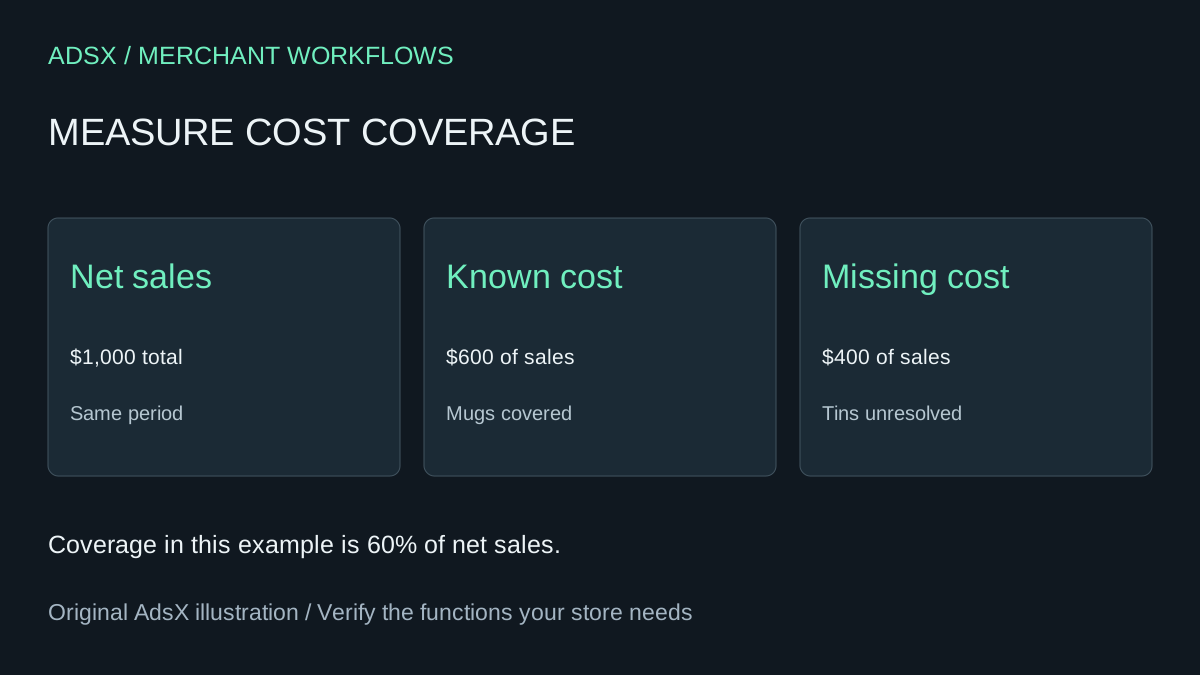
A store sells $600 of mugs and $400 of tea tins. The buyer sees a 60% margin on the mug line and uses it to set an ad budget for both products. Before using that number, check whether the tea tins ever appeared in the profit report.
Original AdsX illustration.
Start with the missing denominator
Shopify reports gross profit for variants that had a cost recorded when they sold. Its documentation supports asking Sidekick for gross profit by variant. Use a fixed date range so the finance team can reproduce the answer in Analytics. A missing result is a reason to inspect the variant and its sales history. A current catalog cost alone cannot establish which cost applied to an earlier sale. Shopify profit reports
For the fictional store, mug sales are $600 after discounts and returns, with $240 in cost. That leaves $360 gross profit on the covered sales, or 60%. The tins account for another $400 in net sales with unknown cost. The store also has 60% cost coverage by revenue. The identical percentages are coincidence: margin divides $360 by $600, while coverage divides $600 by $1,000.
Ask Sidekick for a report, then reconcile its scope
Request gross profit by product variant for your chosen interval. Open the corresponding report and compare it with net sales by variant using the same dates, currency and filters. Join on variant ID when available. Keep unmatched sales on an exception sheet. With returns or offsetting sales, inspect negative rows separately before interpreting a revenue-weighted coverage percentage. Shopify product pricing fields
Suppose a dated supplier invoice later establishes $160 total cost for the tins sold. In your reconciliation worksheet the complete example becomes $1,000 minus $240 minus $160, or $600 gross profit. Record that calculation as an invoice-supported reconstruction. A $200 invoice cost would instead yield $560. Until the evidence is in hand, leave the full-store margin open.
Save the report filters, the missing variant IDs and the owner who will check each invoice. Enter verified costs for future sales through the store’s normal catalog process. If the next decision is ad spend, budget for fulfillment, payment fees and other variable expenses separately before using gross profit as a spending ceiling.
Try the worksheet prompt
Illustrative prompt, not execution-tested.
In Shopify Sidekick, show gross profit by product variant for [start date] through [end date]. Identify the report and filters. For reconciliation, compare against net sales for that interval where available. Flag missing cost coverage and unavailable data. Exclude unknown costs from margin estimates and explain the denominator.
Copy the prompt from the merchant library. For related work, see Audit Shopify Unit Prices Before a Multipack Promotion.