You have 30 minutes before the afternoon pick. The Shopify report grades the best-selling tote A, but yesterday a picker found the last olive apron in an empty bin. Which gets counted first? Give the assistant the reasons for the count and the minutes available. A list sorted by revenue alone will miss the empty bin.
Original AdsX illustration.
Give the assistant two kinds of evidence
Export the variant ABC grades available to your team. Shopify uses revenue contribution to assign grades. A-grade merchandise accounts for about 80% of revenue collectively. A grade tells you how much lost availability might matter, while a picker exception tells you there may already be a quantity error. A costly slow seller can merit attention even with a C grade. Shopify ABC analysis
Make one row per variant and location. Include a stable variant identifier, bin, grade, last count date, open discrepancy and estimated count minutes. If the grade comes from a storewide report, label it storewide. Joining it to two bins doesn't give you two independent measurements of local sales. Shopify inventory reports
Work one shift by hand first
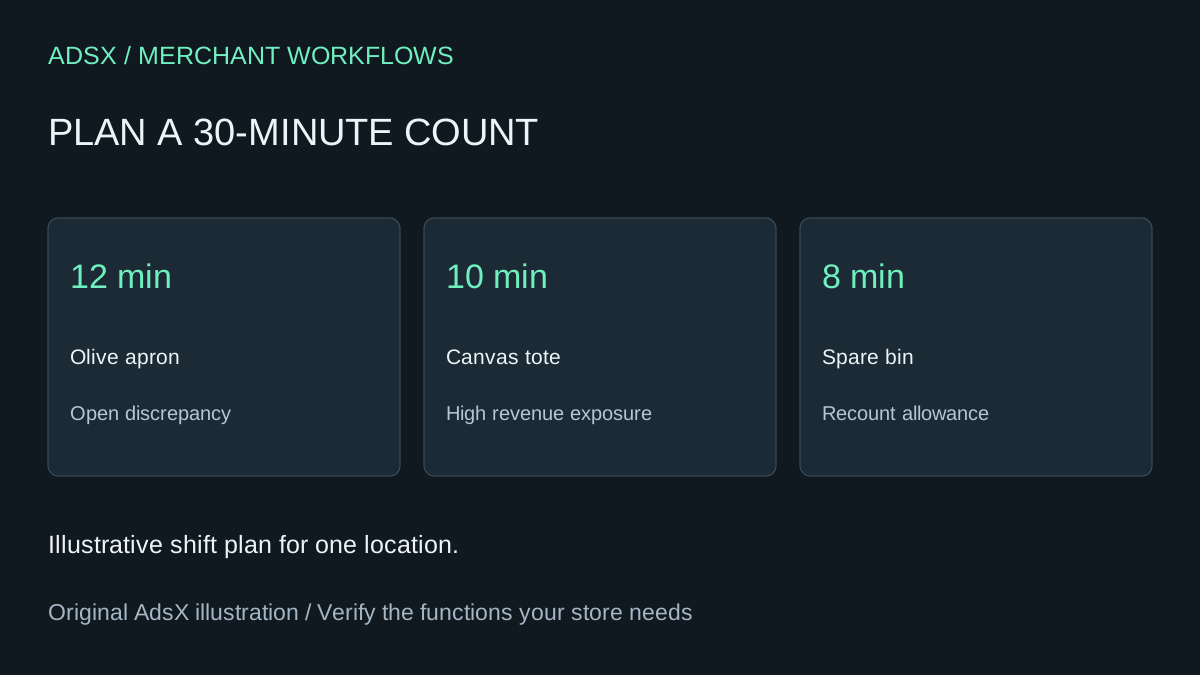
In this example the B-grade olive apron needs 12 minutes because stock may be split between the shelf and receiving. The A-grade tote needs ten. An already checked A-grade belt would take nine. Counting all three takes 31 minutes before a single recount. Assign the apron and tote, keep eight minutes in reserve and put the belt on the deferred list. If the apron investigation overruns, the lead can see exactly which work to postpone.
Ask for the selected rows, total minutes and deferred rows with reasons. Reject an answer that quietly drops a location, invents a last-count date or uses the eight-minute buffer twice. Hand the counter only the identifiers and bin locations for a blind count. Have the lead compare observed quantities with the system afterward. Keep the original plan so next week you can compare estimated versus actual minutes.
Try the worksheet prompt
Illustrative prompt, not execution-tested.
Build a 30-minute physical count plan from these anonymized variant-location rows. Reserve eight minutes for recounts. Prioritize open pick discrepancies, then revenue exposure and time since count. Return selected and deferred rows, reasons and total minutes. Flag missing estimates. Do not adjust stock.
Copy the prompt from the merchant library. For related work, see Why Does My Shopify Inventory Count Keep Changing Back?.